
Frequently Asked Questions
NWSB Digital Banking Tips to Get You Going
Detailed information/FAQs regarding our new digital banking experience.
After the upgrade, you will need to agree to the updated Terms and Conditions for the following features:
- Mobile Deposit: Mobile deposit is a banking feature that allows users to deposit checks into their accounts using a mobile device, such as a smartphone or tablet. Deposits will be approved by NWSB periodically through-out the business day. To access mobile deposit you will click on the deposits button at the bottom and walk through the steps.
- Bill Pay: Bill payees will transfer automatically to the new Bill Pay system but will have to opt in thru the digital banking platform first. Once you opt in, bill pay is also available in the mobile app. Bills set to pay on September 13, will pay on September 16. New payees can now be set up using Picture Pay (more details to come).
- eStatements: Log in to your digital banking experience, select the account you wish to enroll, click on statements and CLICK HERE now to access your statement. You will be presented with an Electronic Statement/Consent and Agreement to accept the terms. The new user sign-up verification must be completed. You will receive a notification that you must be able to receive and read statement in an electronic format and click to verify. This is currently only available for the website, mobile eStatements will not be available until January 2025.
Other upgrade items to take note of:
- Transaction Alerts: Account alerts and notifications will need to be reestablished in your new digital banking experience.
- Internal transfers that are set up for NWSB deposit accounts will not be affected in the upgrade.
New Features:
- External Transfers: This is an easy way to access your accounts at other financial institutions and move money. To set-up you will need to use the online banking platform, select the “Move Money” or “Services and Settings” tab. Choose “Add External Transfer Account” and accept the terms. Enter in your account information for the other financial institution, and choose your available services. Verify all information is correct and click “Submit”. Note: Two small deposits and a single withdrawal with will be submitted at the external account identified. You will be required to validate the amount of these transactions.
- MyCreditScore: Free credit scoring, analysis and simulator powered by Savvy Money. This is available in online and mobile banking. Users will need to opt in using online banking platform and then it is available to also view in the mobile app. To deactivate your account simply go to Resources – Profile Settings and scroll down to Deactivate Credit Score Account.
- My Spending: New and improved personal finance management tools for budgeting, net worth, goals, and cash flow tools.
- Financial Calculators: Check out our upgrades including loan and mortgage calculators, personal debt calculators and savings and retirement calculators.
Other tips:
- If you are an Apple mobile user and use Face ID to log in: Your Username is visible briefly – just prior to Face ID opening your account. That Username is what you will want to use when you initially log in. YOU will need to make sure that you use all lower-case letters for your initial log in, even if your username has both lower- and upper-case.
- If you are an online banking user and use Face ID to log in: You are able to access your username after you log into online banking and click on My Settings (Top Right) and it will show your username.
- Android users Face ID does not apply to you.
- Please remember if you use Face ID to log in and your passwords are saved on your device, you will need to update these after your initial log in.
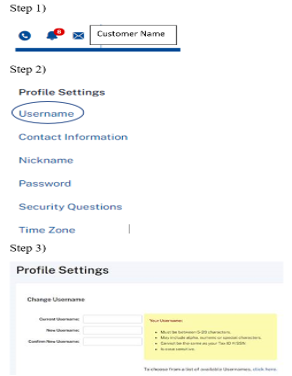
- Once logged into the new online digital banking system, you will be able to update and/or change your username.
- Please DO NOT update your username before you successfully login to the new system or you will have access issues.
- The screenshots below show you the steps to change your username.
Q. How do I sign up for online banking?
A. Choose Enroll Now from the log in screen.
Q. Who do I contact with questions about Business Online Banking?
A. Please call our Customer Care Center at 888-639-0829 or email callcenter@newwashbank.com or treasury@newwashbank.com and someone will reach out to you.
Q. Who do I contact with questions about Online Banking?
A. The Customer Care Center at 888-639-0829 or callcenter@newwashbank.com
Q. How can I add an account I just opened to my Online Banking?
A. Contact the Customer Care Center at 888-639-0829
Q. What happens if I can’t remember my username or password?
A. Use the link provided to reset your password; contact our Customer Care Center at 888-639-0829 for access to your username.
Q. Can I use electronic bill payment with all my accounts?
A. Only checking accounts can be used for bill payment purposes.
Q. Who can be paid using the bill payment system?
A. Anyone in the 50 United States and territories who can accept a check can be paid using the bill payment system. You can pay practically anyone; charge accounts, utilities, auto loans, professionals, even a lawn care service or relative. However, tax payments (such as federal, state and local) and court directed payments (such as alimony and child support) cannot be processed through our online bill payment system.
Q. Can I pay my taxes at your website?
A. We do not take tax payments at our website. You can pay your taxes online by going to the https://www.eftps.gov/eftps/
Q. What is the minimum to open a checking or savings account?
A. The minimum is $100.00.
Q. Where can I find my account and routing numbers?
A. You can easily find them on your check (see below) or monthly statement or you can also call our Customer Care Center at 888-639-0829.

Q. How do I set up direct deposit?
A. Contact your employer or the agency issuing the funds and complete a direct deposit form.
Q. What is the difference between the available balance and the memo balance?
A. The memo balance includes holds currently placed on your account and deposits and/or debits that have not yet posted to your account.
Q. Where can I find my account balance?
A. There are several ways: 1) Online banking 2) Mobile App 3) Calling our Infoline at 800-556-5429 or 4) Call our Customer Care Center at 888-639-0829
Q. Is the ATM balance the actual balance in my account?
A. No, the ATM balance does not reflect outstanding checks or memo activity on the account.
Q. Can I open a savings account for my grandchild?
A. Yes, as long as you have documentation verifying the child’s social security number.
Q. If I have a student/children’s account, does it convert to a regular account the day I turn 23 or the month?
A. An INUTMA account will not automatically convert, a change request must be initiated in a branch.
Q. Can I order checks online?
A. Yes, click here https://www/deluxe.com to order your checks from Deluxe.
Q. I lost my PIN, how do I get a new one?
A. Please call our Customer Care Center at 888-639-0829 or visit any branch and a representative can assist you.
Q. Do deposits put into the ATM receive immediate credit?
A. No, it takes about 24 hours to post.
Q. Can I get more than one card per account?
A. Yes. For personal accounts, the person’s name must be on the account. For business accounts, authorized signers may request additional cards to be issued.
Q. Is the ATM balance the actual balance in my account?
A. No, the ATM balance does not reflect outstanding checks or memo activity on the account.
Q. What is my daily withdrawal limit at the ATM?
A. $500.00
Q. What is my VISA check/debit card daily limit for in-store or online transactions?
A. $3,000.00
Q. Can my daily limit be increased?
A. Yes, call our Customer Care Center at 888-639-0829 or visit any branch and a representative can assist you.
Q. Is there a charge for using my VISA Check/debit card?
A. NWSB no longer charges for card swipes.
Q. What number do I call if my card is lost or stolen?
A. During business hours contact our Customer Care Center at 888-639-0829 or After hours call 800-264-4274.
Q. Can you choose your own PIN for your ATM/debit card?
A. Yes, you can change your PIN at any NWSB ATM machine or you can visit any NWSB location and a representative can assist you. You will need your current PIN to make the change.
Q. How long does it take to receive a debit card?
A. All NWSB locations can print a card for you the same day. If one needs to be ordered and mailed it can take 7 to 10 business days.
Q. Do you offer credit cards?
A. Yes, you can apply online or request an application at any of our branch locations.
Q. Can I get cash back with my VISA check/debit card?
A. Yes, as long as sufficient funds are available in the account.
Q. Will my debit card work in ATMs other than NWSB?
A. Yes, however; a foreign ATM charge will apply.
Q. How old do you have to be to get a card when you have a savings/checking account?
A. There is no age restriction on a debit card. As long as they have a student checking they can have a debit card.
Q. What is my loan payoff?
A. You can call us anytime during business hours at our Customer Care Center (888) 639-0829, or email at callcenter@newwashbank.com.
Q. Can I have my loan payment deducted from my account?
A. Yes, you can have the payment automatically deducted by signing up at any of our branch locations or by calling our Customer Care Center (888) 639-0829, or email at callcenter@newwashbank.com.
Q. Can I make my payments online?
A. Yes, you have several options for making your payment online.
By logging into the NWSB website or the mobile app, you can make an online transfer from an NWSB deposit account to your NWSB loan; By using the payment portal located on the NWSB website, no log-in required, you can make a payment to your NWSB loan using a deposit account or a debit card; By using the Bill Payment Option, you can schedule a payment to be made from your NWSB deposit account to a loan with someone else.
Q. Do you allow cosigners on loans?
A. Yes, on a case by case basis.
Q. What is my loan number?
A. Your loan number can be located on your loan contract or your monthly billing notice. You can also call our Customer Care Center (888) 639-0829 for assistance.
Q. Do you finance land loans?
A. Yes. Please call any of our branch offices for details.
Q. Do you make mortgage loans?
A. Yes, for details please see our Lending-Home Loans page.
Q. What are your auto loan rates?
A. For rates on automobiles, boats, RV’s, etc. you can stop into or call any of our locations. Our loan officers would be happy to assist you.
